World Map
Hex regions, combat / dungeon / camp / event tiles, Region Resonance, and the Exploration Skills tree.
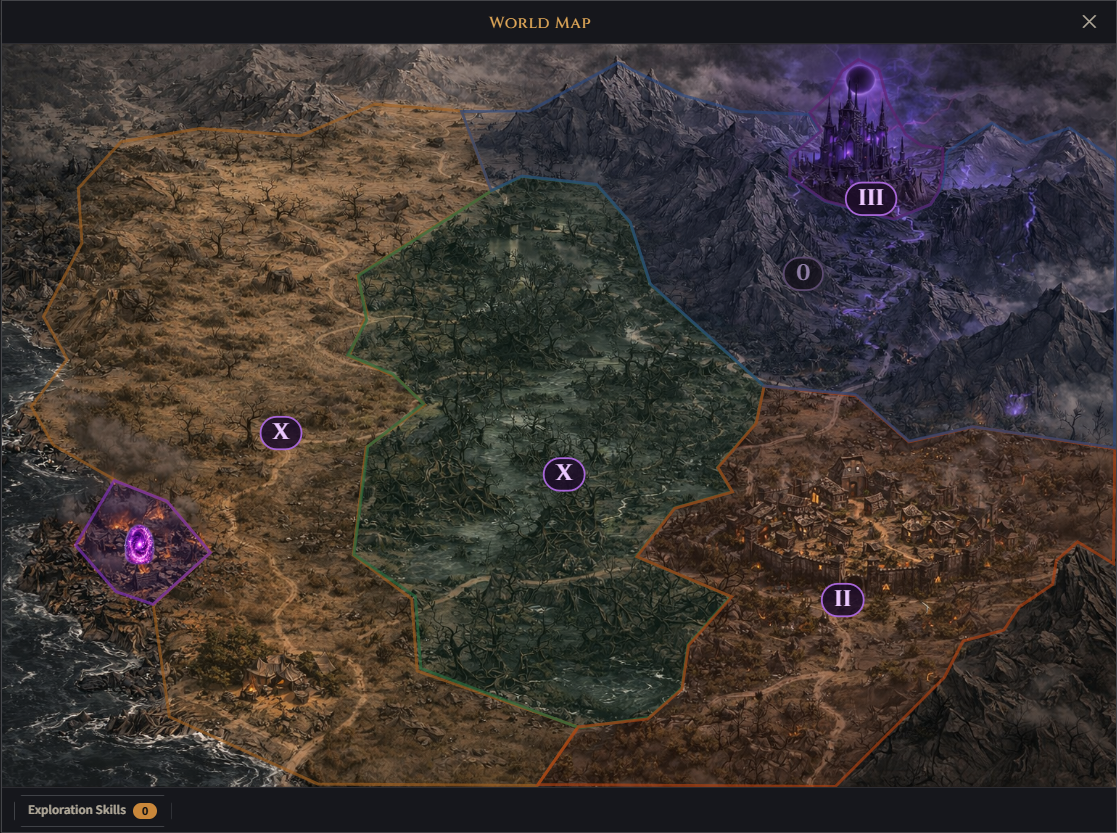
Open the map from the World Map entry in the Camp menu; the entry shows the region you are in, how many of its tiles are cleared and its applied Resonance.
The world is split into hex regions you unlock in order. Each region map is built from painted hex tiles, and a fog of war covers everything you haven’t seen yet: the camp, every cleared tile and its neighbours, and every tile you can reach are revealed; the rest stays under drifting clouds until you get there, and the trails only show on tiles you can reach. A conquered region lifts its fog completely. Click a tile to pick where to fight:
- Combat tile — clear 500 kills to unlock the adjacent ones.
- Dungeon tile (one per region) — clearing it opens the next region. Entering one charges a gold entry fee and a confirmation prompt warns you before the run actually begins.
- Camp tile — where your camp stands in that region. Nothing spawns there and it is not a fighting tile.
- Event tile — one-time story tile that unlocks an NPC or quest beat.
There are exactly three event tiles in the world, and visiting one is a one-time interaction: the tile shows as completed afterwards and cannot be re-entered.
| Tile | Region | Unlocks |
|---|---|---|
| Witch’s Hut | Cursed Swamp | The Witch at camp |
| Survivors’ Town | Scorched Foothills | The Tavern |
| Mountain Pass | Shattered Mountains | Lore and main-quest progression |
An uncleared combat tile on the frontier traces its kill progress toward 500 around its rim; a cleared one gets a light rim and wash (violet while Resonance is applied), quiet enough that an explored region still shows its painting. The camp, the dungeon and the event tiles are painted landmarks lit in their own accent (camp firelight, dungeon violet, event amber). The selected tile — your current tile when the map opens — carries a pulsing gold frame. Clicking a combat or dungeon tile names its type, level and clear status before you commit.
Clearing a combat tile for the first time grants +1 Exploration Point — the only source of them, and the reason to keep pushing into new tiles.
Auto-explore
Start a fight on an uncleared combat tile and the hero explores the region by itself: after each clear it moves on to the uncovered tile nearest the tile you started on (hex distance; lower rank wins ties). Starting on a cleared tile is plain farming, as before.
- It never picks dungeons or event tiles and never leaves the region; an untriggered event tile still uncovers nothing behind it.
- Tiles more than 10 ranks above your level are skipped. When nothing qualifies (level cap reached or region done), exploring ends and the hero keeps farming the last cleared tile.
- Death, Stop Combat or picking another tile ends it; picking another uncleared tile starts a new exploration from there.
- Clears while exploring show no modal and don’t stop combat — a toast and log lines report the rewards and the next tile. The combat HUD and the region bar read ”· Exploring”, and a dashed cyan ring marks the next tile on the map.
- It keeps going offline; the offline recap lists the areas explored.
After the final dungeon, the region map view gains a Resonance card in its top-right corner (with Resonance I already unlocked for free): a dropdown that lifts the region’s cleared combat tiles onto the shared level ladder (top tile 110 at I, +10 per level up to 200 at X), a kill-counter bar, and the purchase button for the next step. See Region Resonance for the full ladder. The dropdown only responds while combat is stopped. On the world view each unlocked region carries a badge with its purchased Resonance numeral (0–X, glowing when a step is ready to buy).
The Exploration Skills button at the bottom of the map opens the passive tree those points are spent in.