Inventory & Equipment
The paper-doll, the inventory grid, equipping and locking items on desktop and mobile, and how Constitution reduces damage.
On this page
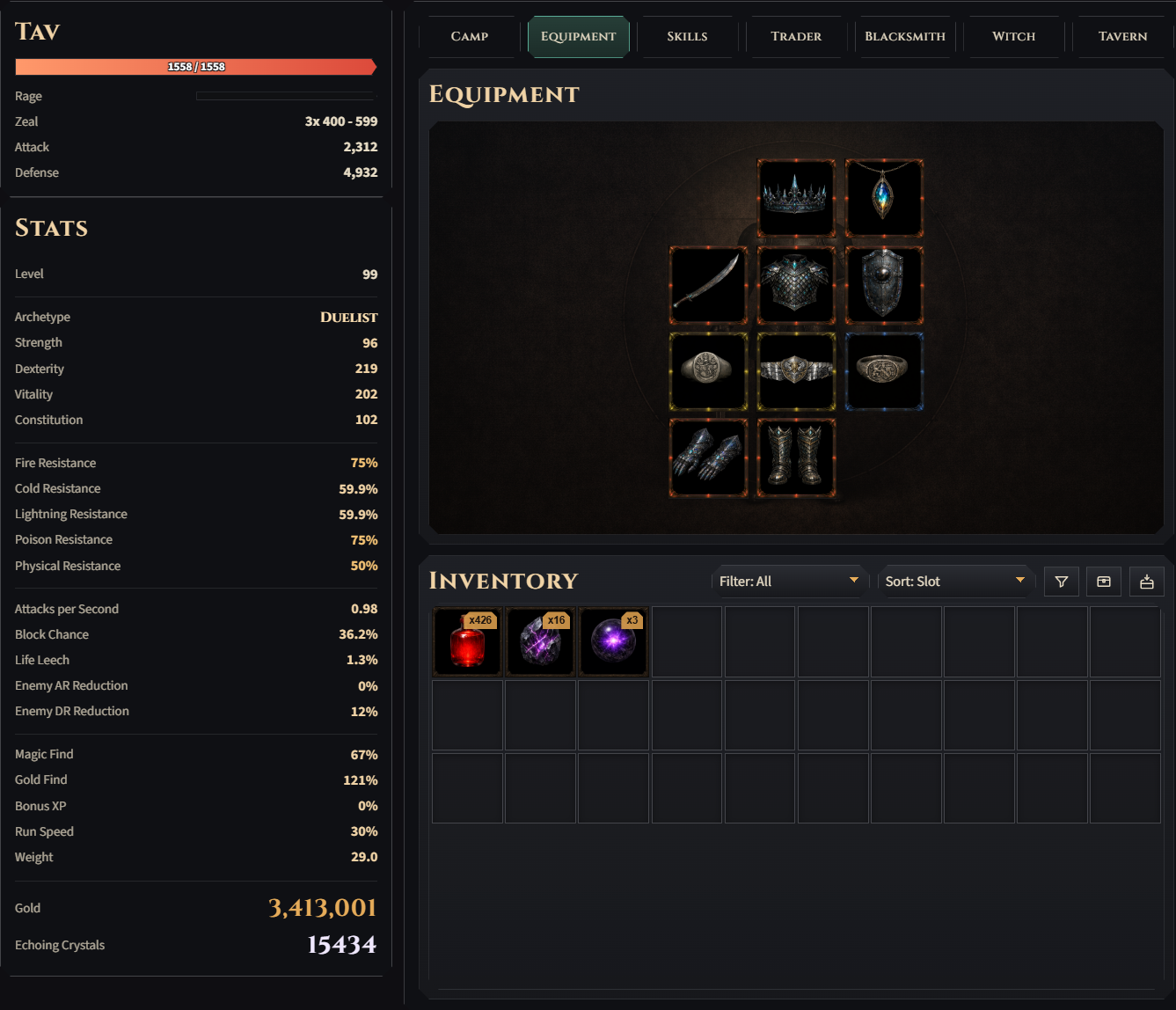
The Equipment tab shows your paper-doll: head, amulet, chest, both hands, both rings, belt, gloves, boots. The inventory grid sits below the tab area on the Equipment, Skills, and Camp tabs; it’s hidden on the NPC and Statistics tabs.
The two hands take a weapon in either slot, so a weapon simply goes to whichever hand is free. You can hold a weapon and a shield, or two weapons (dual wield) — never two shields. The two ring slots are interchangeable in the same way, and the same unique ring may be worn in both.
With two weapons worn, one of them is your main hand: it carries the badge on the paper-doll, and only its class grants its weapon training bonuses (both weapons earn rep, each at half rate). Right-click the equipped off-hand weapon to promote it (left-click still unequips); on mobile the equipped weapon’s item sheet has a Main hand button next to Unequip. Unequip the main hand and the remaining weapon is promoted for you.
Two-handed weapons — greatswords, claymores, greataxes, halberds, mauls and every staff — are the exception: one of them occupies both hands. Equipping it moves whatever is in the other hand back to the bag, and equipping any hand item while it is worn takes it off the same way; either move is refused when the bag is full, exactly like a blocked unequip. The paper-doll draws the two-hander’s icon greyed and dashed in the hand it blocks rather than showing an empty slot, and hovering, clicking or tapping that hand acts on the two-hander. What you give up and what you get for it is on Item Base Types.
Requirements
Equipment carries a level requirement only. There are no Strength or Dexterity requirements, so any class can wear any item the moment its level requirement is met. The requirement sits on the tooltip and turns red when your level is too low. How that number is derived from the item level is on Loot & Drops.
Auto-unequip. After every equip, unequip, finished craft and free class change, each worn item is re-checked against its requirement, and anything you no longer qualify for is moved back to the bag with a log line. In practice this only fires when a Blacksmith Upgrade Base pushes an item’s requirement above your current level, since nothing you wear can invalidate anything else you wear.
Desktop
- Left-click an inventory item to select it (its card highlights). Then click a compatible equipment slot to equip it.
- Click an equipped slot with nothing selected to unequip the item back to inventory.
- Right-click an inventory item (or use the padlock badge) to toggle its lock. A locked item is skipped by auto-sell and by the Trader’s bulk Sell Loot buttons, cannot be salvaged, and is never quietly eaten as base-upgrade fodder: consuming one as a sacrifice takes an explicit Unlock and Start confirmation. Locking does not block tempering or enchanting.
- Hovering an inventory item shows its tooltip plus a “Currently Equipped” card for each worn counterpart of that slot — so a hovered ring with both ring slots filled makes three cards, which wrap to a second row rather than run off-screen. When two counterparts are shown, each card also names its slot.
Bag size
The inventory holds 20 slots (INVENTORY_SLOT_COUNT). One stack of a stackable item (potions,
crafting materials) occupies a single slot no matter how many it holds. The Inventory Slots
bedroom upgrade adds +1 slot per level, up to +10 — a maxed bedroom
gives you 30. Drops that would need a fresh slot in a full bag are discarded, and purchases or craft
results are refused outright, so keep a few slots free.
Belt & potion slots
You always have 1 potion slot, belt or no belt (POTION_SYSTEM_CONFIG.baseBeltSlots). A worn
belt adds its own on top, one more per tier:
| Belt | Slots added | Total potion slots |
|---|---|---|
| No belt | — | 1 |
| Tier 1 | +1 | 2 |
| Tier 2 | +2 | 3 |
| Tier 3 | +3 | 4 |
| Tier 4 | +4 | 5 |
| Tier 5 | +5 | 6 |
The rare Potion Slots affix stacks on top of that. A belt at 0 durability is treated as broken: capacity drops straight back to the single base slot until you repair it.
The Stash
The Stash is your storage: a side panel on the Equipment tab, toggled with the chest
button next to the inventory sort control. Its first tab, Private Stash, belongs to the hero. It holds 50 slots (STASH_SLOT_COUNT) with the same
stack semantics as the bag.
- Items move between bag and stash one whole stack per click, in either direction. A move is refused (and nothing changes) when the destination has no room.
- A header button deposits every material in your bag into the stash in one go.
- Stashed gear is inert: it is never auto-sold by the loot filter and never pulled for belt refills, and it can’t be salvaged from storage — withdraw it first.
- Crafting materials are the exception. Every cost check and consumption at the Blacksmith and Witch runs against the combined bag + stash pool (bag stacks are drained first), so Echo Shards and Cores stay usable while stored. Base-upgrade fodder may also sit in the stash.
The stash window has a second tab, Shared Stash: 50 slots your whole account shares, for handing items from one hero to another. Materials there don’t count for crafting. See Trading.
Unrevealed uniques
A unique never lands finished. A fresh one sits in your bag under its plain base item name in unique gold, every affix is a masked ”???” line, and its tooltip shows what the Trader charges to reveal it. Worn, it gives only its base item’s stats.
Click it on the Trader tab to choose: reveal it for gold (the item takes its real name and every affix turns on) or sell it as it is for its plain base value. On a phone, its item sheet on the Trader and Equipment tabs also has a Reveal button, which only asks to confirm the price. The full rules and numbers are in Loot & Drops.
Loot Filter
The funnel icon in the inventory toolbar opens the Loot Filter — a 9×3 Sell/Keep matrix (equipment category × rarity) with one-click presets (Off / Tidy / Aggressive / Endgame). Each cell opens a small menu: Don’t sell, Sell (any tier), or a tier cap (“Sell up to Tier 2”). The matrix drives auto-sell on drops (at ×0.15 value, far below a manual sale on purpose); items already in the inventory are never touched. Uniques, locked items and items being crafted are never auto-sold, and the whole filter stays inert until the Trader is unlocked. The same panel also opens from the Loot Filter… button on the Combat config card.
Below the presets, Apply filter to exploration rewards (default off, untouched by presets) also runs the item you get for clearing a combat tile through the matrix — live, while auto-exploring and offline. A match is auto-sold like a drop and the clear’s log line then shows only gold and XP. Dungeon first-clear rewards and hunt bounties are never filtered.
Hover an Auto-sold line in the combat log (phone: tap it) to see which row sold the drop.
Full Loot Filter
Settings → Full Loot Filter (per hero, off by default) gives the filter more rows and keep rules:
- ▸ opens a row into its bases. Weapon opens into its five weapon classes (Blades, Axes, Blunt, Daggers, Staves) and each class into its bases (Sword, Claymore, …); every other row opens straight into its bases (5 each, Amulet 3, Ring 2). A class or base row follows the row above it (dashed cells) until you set one of its cells (●); the closest set cell decides. Same as … in a cell’s menu, or ↺ on the row, makes it follow again, and Reset next to the preset clears every class and base row. On a base row the tier cap names the base: Sell up to Refined Battlestaff.
- Presets set the 9 slot rows only; class and base rows keep their cells.
- Always keep beats every Sell cell: magic and rare drops with at least 1, 2 or 3 of your wanted affixes (one list for every slot), and A base to upgrade your gear: a normal drop of the next-tier base of something you wear (amulets and rings: any non-unique copy), the copy the Blacksmith’s base upgrade eats, while your bag and stash hold none. Only magic, rare and unique gear counts, as only those can be upgraded. A drop Always keep kept gets a ★ in the combat log and its rule on hover.
- Turned off, the class and base rows and Always keep pause: they stay saved, and the 9 rows alone decide until you turn it on again.
Mobile
- Tap an inventory item to open an action sheet with a single Equip button plus Sell, Salvage and Lock (and an × to close). Tapping an equipped weapon opens the same sheet with Unequip and, while two weapons are worn, a Main hand button.
- The sheet’s lower half is the equipped-comparison card. When the tapped item’s slot type has two worn counterparts — both rings, two weapons, or a weapon and a shield — chevron paddles flip the card between them.
- Equip never asks which side. A ring fills a free ring slot (left before right); with both rings worn it replaces the one currently shown on the comparison card, so the chevrons double as the target picker. A weapon works the same way now that dual wield exists: with one weapon worn it takes the free hand, and with two worn it replaces the off-hand by default, so your main hand survives the swap — flip the chevrons to target the other one instead. A shield still has only one place to go (the worn shield’s hand, or a free hand), so for shields the card stays a viewer.
- Chevrons on the tapped item’s own card step to the previous / next entry of the sorted, filtered bag (the stash list when the sheet was opened from stash withdraw), so you can walk a whole drop haul without closing the sheet. They stop at either end — no wrap-around.
- Tap an equipped slot to see a read-only preview; double-tap quickly to unequip.
Belt slots auto-refill from the inventory between fights, highest tier first.
Attributes are never spent by hand. Your class grows all four automatically with every hero level, and the hero box on the side only reports the current values; the class you picked at creation is what decides how they grow. Skill points are still spent from the Skills tab; skills you can spend on right now glow with an ember halo.
Constitution’s flat per-hit damage reduction = Constitution × 0.0025 × your level, subtracted from every hit you take.