Combat
Combat is fully automatic — how the fight runs, Auto-Potion, the Loot Filter, and stopping a run.
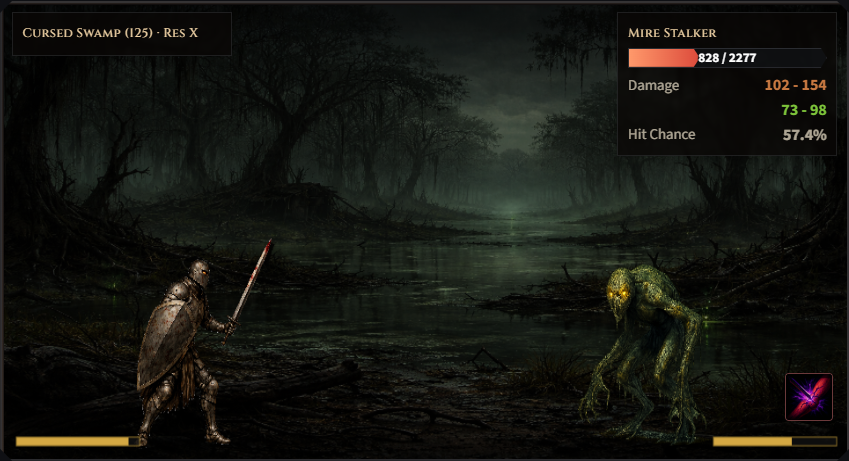
The Combat view is where the fight happens. Combat is fully automatic — your hero auto-attacks on its own attack interval and casts enabled active skills by their trigger rules; you never click to swing. What you choose is the tile, the gear, the skills, and the two cards below the combat box.
Those two cards tune the run:
- Auto-Potion — slider for the HP % at which a belt potion fires (default 45%, adjustable in 5% steps from 10% to 90%). Tick Adjust to enemy (avoid one-shots) and the threshold is derived from the current enemy instead: the lowest slider step that still sits above its worst single unblocked swing against your mitigation (max physical hit plus its instant elemental rider), with a 2%-of-max-HP safety margin on top; poison enemies add a budget for the DoT stacks that can tick in the same step. It is recomputed per potion check, so a new spawn, a boss, or a gear change is picked up immediately. If even the 90% ceiling can’t cover the spike, the readout turns to a warning rather than pretending you are safe.
- Loot Filter — a Sell/Keep matrix (equipment category × rarity, with presets) that auto-sells matching drops as they fall at ×0.15 value — see Inventory. Settings → Full Loot Filter adds rows for weapon classes and single bases, and Always keep rules.
Pick your main skill (the swing that replaces auto-attack) on the Skills → Main tab, and configure active skills on Skills → Active.
Combat keeps running if you switch tabs or close the browser — offline catch-up replays the missed time on return, up to the 8-hour offline cap (extended by the Bedroom’s Offline Cap upgrade).
To stop a run, press Stop Combat — an inline button under the combat view on desktop, or a full-width fixed bar at the bottom of the screen on mobile.